 SplitTrack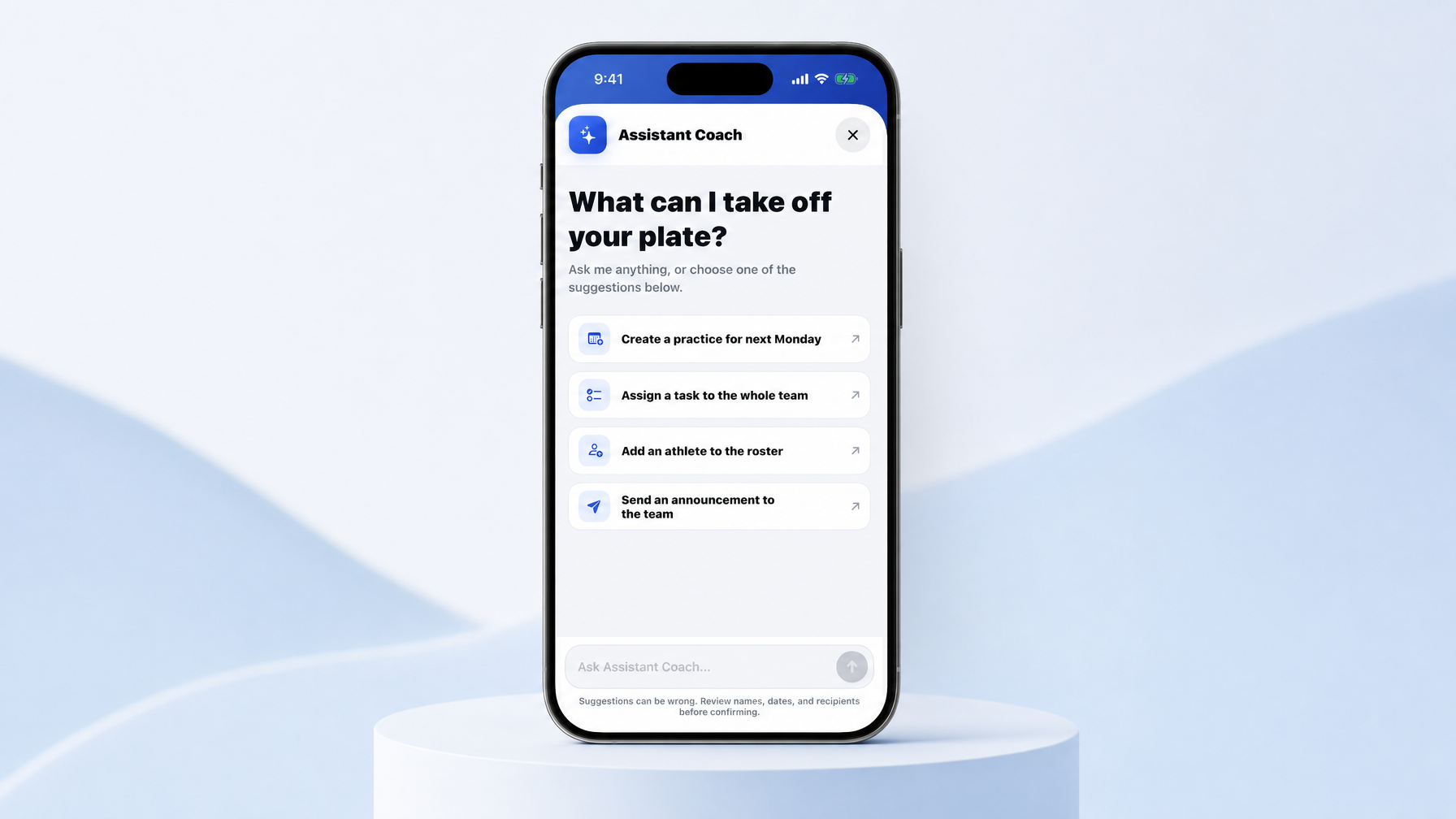
We shipped Assistant Coach inside Split Track on iOS and Android. It lives behind the global Help button. You talk to it like a human assistant: create practices and multi-event weekly schedules, build practice plans, assign team tasks, add athletes to the roster, send announcements, or ask how something works in the app. It gathers missing details in conversation, shows you a structured summary first, and only runs the change after you confirm. Same permissions and validation as the regular UI. Fresh chat every time you open it. Built for coaches who already have enough taps on their plate.
If you coach high school track and field or cross country, you know the real job is not “open six screens and fill fifteen fields.” The real job is: get Monday’s multi-event practice on the calendar, get the JV kids on the roster, tell parents the bus time changed, and still make it to the track with a plan.
That is what Assistant Coach is for.
We built it as an AI-powered help and action layer inside Split Track, available throughout the iOS and Android apps from the global Help button. Not a separate chatbot website. Not a generic “AI coach” that spits out random workouts with no connection to your team. It works inside the same program you already use for practices, roster, tasks, and announcements.
What is Assistant Coach?
Assistant Coach is a natural-language layer on top of the actions you already take in Split Track.
You can:
- Create practices and multi-event weekly schedules
- Build practice plans
- Assign team tasks
- Add athletes to the roster
- Send team announcements
- Ask questions about how to use Split Track
Open Help and you land on a simple screen: “What can I take off your plate?” You can type freely, or tap a suggestion like:
- Create a practice for next Monday
- Assign a task to the whole team
- Add an athlete to the roster
- Send an announcement to the team
The AI reads your intent, picks the right supported action, and asks only for what is missing: dates, times, duration, location, recipients, and other required fields. When the same details apply across several events, it can carry them forward so a full week does not feel like ten separate forms.
That last part matters for running programs. A distance day, a sprint day, and a field event block often share the same week, venue, or time window. Assistant Coach is built to handle that without forcing you through rigid client-side scripts.
How it works (and what it will not do)
Here is the flow, in plain terms.
- You open Help and start a request in everyday language.
- Assistant Coach figures out which supported action you mean.
- It asks for anything still required.
- Before anything changes, it shows a structured summary.
- You review names, dates, and recipients, then confirm.
- The backend checks permissions and runs the same operations the normal app UI uses.
That confirmation step is not optional window dressing. Suggestions can be wrong. The product copy says it out loud: review before you confirm. We want speed without silent mistakes on a live roster or a parent announcement.
A few design choices coaches will care about:
Permissions stay yours. If you could not do it in the standard UI, Assistant Coach cannot sneak it through.
Validation stays the same. Required fields and rules still apply.
Each Help session is temporary. Close the modal and the conversation is gone. No permanent chat history cluttering the team record.
Support and actions live together. You can ask “how do I…?” and also “do this for me…” in one place.
Debug builds also surface estimated OpenAI usage and session cost for our own testing. That is for development visibility, not something coaches need to manage day to day.
Why this fits track and field and cross country
Generic sports apps and generic AI tools both miss the same thing: your week is operationally messy in a very specific way.
You are not only “scheduling a practice.” You are stacking multi-event days, XC long runs, weight sessions, roster adds mid-season, tasks for uniform returns, and announcements that need the right audience. Our coach’s guide to track and field and cross country team management software covers why running programs need more than a calendar and a group chat. Assistant Coach sits on top of that same foundation.
The goal is less navigation and less repetitive data entry. Tap Help. Say what you need. Confirm the summary. Get back to coaching.
Other coaches and writers have been exploring AI for practice design and season planning in general terms. Tools outside your team app can draft ideas, but they usually stop short of putting the plan into the system your athletes and parents already open. Assistant Coach is different because the output is a real action inside Split Track, after you approve it.
Example prompts you can try
Use free-form language. These are starting points, not scripts.
- “Create practices Monday through Thursday next week at 3:30 at the track. Distance group focus.”
- “Build a practice plan for Tuesday: warm-up, 6x400, cool-down.”
- “Assign a task to the whole team: bring physical forms by Friday.”
- “Add [athlete name] to the roster, distance.”
- “Send an announcement: Saturday meet bus leaves at 7:15 a.m. from the front of the school.”
- “How do I set up live splits for practice?”
If something is missing, Assistant Coach asks. If the week shares a location or time, it can reuse those details across events when it makes sense.
What this is not
A few honest boundaries:
- It is not a replacement for your coaching judgment on workouts, loads, or who races.
- It is not a silent auto-pilot. Confirmation is required before changes land.
- It is not a permanent AI diary of your program. Sessions are temporary.
- It only runs supported actions. If you ask for something the app cannot do yet, it should help you understand that rather than invent a fake success.
We would rather be clear and useful than magical and wrong.
Who this is for
Assistant Coach is for head coaches, assistants, and anyone on staff who already lives in Split Track for day-to-day team ops: practices, plans, roster, tasks, and announcements across track and field and cross country.
If you are new to the product, start with the story of why we built it in We Built This for You, Coach, then load the app and hit Help.
How to try it
- Update to the latest Split Track on iOS or Android.
- Open the global Help button.
- Pick a suggestion or type your own request.
- Answer any follow-ups.
- Read the summary carefully.
- Confirm only when it looks right.
First month free for new coaches who want to run a real practice week in the app: getsplittrack.com.
We built Split Track so the admin layer of coaching takes less of your night. Assistant Coach is the next step: fewer screens, same safeguards, language you already use when you text an assistant coach “can you put Monday’s practice on the schedule?”
Tap Help. Tell it what to take off your plate. Confirm. Then go coach.
Wes