 SplitTrack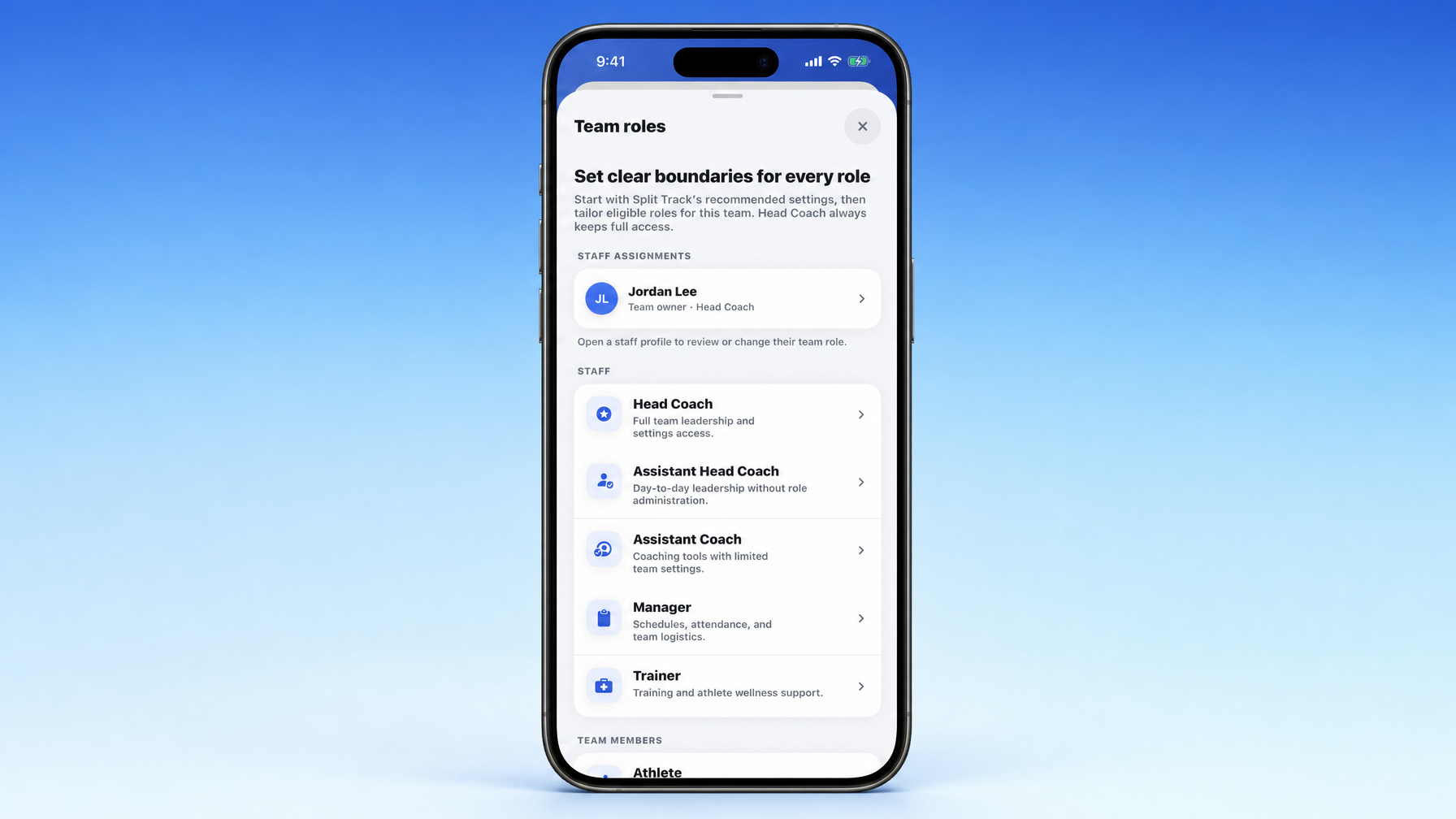
We replaced four blunt account types with seven policy roles and a permission model coaches can actually run a program with. Identity (who someone is), policy (what that role usually allows), and authorization (whether this action is allowed right now) are separate. Ten product areas. Four access levels. A few sensitive capabilities called out on their own. Head Coach is locked full access. Invites carry exact staff roles. The server enforces the rules, not just hidden buttons. Live on iOS and Android inside Edit Team → Team roles.
If you have ever wondered whether your assistant should edit the roster, whether a manager should see wellness notes, or whether a trainer can own workouts without touching team settings, you already hit the limit of “everyone is a Coach or a Manager.”
That used to be us.
Split Track started with four broad account types: coach, manager, athlete, and parent. Fine when the app was smaller. Not fine once scheduling, training, attendance, chat, media, meets, and admin tools all lived in the same place. A title could say who someone was. It could not reliably answer who is allowed to do what.
So we shipped a real authorization system built for how high school track and field and cross country staffs actually work.
What changed in plain English
We stopped treating “role” as one fuzzy label and split three ideas:
| Concept | Meaning |
|---|---|
| Identity | Who this person is on the team |
| Policy | What that role normally allows |
| Authorization | Whether this specific action is allowed right now |
Coaches configure the middle. The server enforces the last one on every sensitive request.
Seven roles that match a real staff
Open Edit Team → Team roles and you get the screen titled “Set clear boundaries for every role.” Copy in the app says it straight: start with Split Track’s recommended settings, then tailor eligible roles for this team. Head Coach always keeps full access.
Staff assignments sit at the top (for example, team owner as Head Coach). Below that, the staff list:
- Head Coach, Full team leadership and settings access.
- Assistant Head Coach, Day-to-day leadership without role administration.
- Assistant Coach, Coaching tools with limited team settings.
- Manager, Schedules, attendance, and team logistics.
- Trainer, Training and athlete wellness support.
- Athlete
- Parent
Older app versions still understand the broad coach / manager / athlete / parent buckets. New clients and the server also carry the exact staff role, so an Assistant Head Coach and a Trainer are not the same person wearing a generic “Coach” hat.
How existing teams were migrated (conservative):
- Team owners → Head Coach
- Existing coaches → Assistant Coach (unless ownership says otherwise)
- Managers stay Manager
- Athletes and parents stay compatible
No drama for people still on an older build.
Ten areas. Four levels. Not fifty tiny toggles.
Permissions sit in ten product areas coaches already recognize:
- Team
- Roster
- Schedule
- Attendance
- Meets
- Training
- Tasks
- Chat
- Media
- Store
Each area uses the same four levels:
| Level | Meaning |
|---|---|
| None | Area is unavailable |
| View | Read-only |
| Participate | Ordinary member actions |
| Manage | Create, edit, delete, administer that area |
Four capabilities stay separate because they cut across areas:
- Manage staff roles
- View contact information
- View wellness information
- Publish publicly
That keeps privacy and staff admin from collapsing into one vague “can edit” switch.
Defaults you can trust, overrides you can reverse
Every role starts with recommended server defaults. Examples:
- Head Coach: full control
- Assistant Head Coach: day-to-day ops; staff-role admin off by default
- Assistant Coach: core coaching surfaces; tighter team, store, wellness, and publishing access
- Manager: schedule, attendance, logistics, participation
- Trainer: training-first, with room for appropriate health-related visibility
- Athlete / Parent: view or participate in ways that fit their relationship to the team
A team only stores a policy record when it customizes a role. Reset clears the override and snaps back to current recommended defaults.
Two people editing the same role at once? The second change hits a clear conflict instead of silently wiping the first. Version checks and serializable transactions keep that honest.
Head Coach is protected on purpose
Head Coach is a system role, not a free-for-all setting:
- Always resolves to complete access
- Permissions are read-only in the apps
- Bad or stale database overrides cannot shrink it
- Team owner keeps governance and staff-management access
- Nobody can request Head Coach through an invitation
- The Head Coach policy cannot be customized or reset through the API
You should not be able to lock yourself out of your own program by accident.
Invitations carry the exact role
Staff invites now request a specific role through the whole flow:
- Assistant Head Coach
- Assistant Coach
- Manager
- Trainer
Head Coach is not inviteable. That stays intentional.
Elevated staff requests stay pending until an authorized coach approves. Approval is transactional: still pending, membership created or updated, exact staff role plus compatible broad role and display title assigned, team activated, chat access reconciled, reviewer and time recorded.
Managers can enter as limited members while they wait, but sensitive attendance management stays locked until approval. A pending applicant can also fix the requested role before approval without burning the invite twice.
New-team onboarding still keeps the first choice simple: Coach and Assistant Coach. After the team exists, leadership can assign Assistant Head Coach, Manager, and Trainer as needed.
Hidden buttons are not security
The apps hide or show controls based on permissions. The backend is the real boundary.
API routes map into the same ten areas. Central guards require the right access level instead of “any Coach can do this.” Sensitive examples:
- Staff assignment changes need manage staff roles
- Athlete contacts are stripped without view contact info
- Wellness endpoints need view wellness info
- Public publishing needs publish publicly
- Attendance management uses its own area rules
- Chat admin, training, media, events, tasks, and team settings check their policies
Resolved permissions are cached per request so the server is not re-querying the same membership over and over.
Where you find it in the app
On iOS and Android: Edit Team → Team roles.
You will see:
- Headline: Set clear boundaries for every role
- Recommended defaults, with room to tailor eligible roles for this team
- Staff assignments (open a staff profile to review or change their team role)
- Full Staff list (Head Coach through Trainer) and Team members (Athlete, Parent)
- Role editing patterned after training-group editing
- Focused sheet to change an eligible person’s role
- Read-only role view if you cannot manage staff
- Read-only Head Coach permission detail (always full access)
- Permission-aware buttons and screens across the app
- Clearer waiting and approval states for exact staff-role requests
iOS presentation matches the rest of the product: left-aligned titles, circular close, normal type, cleaner rows, profile push instead of stacking another modal inside Team roles.
What this is not
- Not a fifty-switch compliance nightmare
- Not “everyone who coaches gets full admin”
- Not a way to invite a second Head Coach through the side door
- Not UI-only security
It is staff structure that matches how track and XC programs actually run, with the same permission story on phone and server.
How to try it
- Update Split Track on iOS or Android.
- Open Edit Team → Team roles.
- Review defaults for Assistant Head Coach, Assistant Coach, Manager, and Trainer.
- Customize only what your program needs.
- Invite staff with the exact role you want. Approve elevated requests when they land.
New to Split Track? Start with We Built This for You, Coach and the coach’s guide to track and field and cross country team management software. First month free at getsplittrack.com.
Your staff is not four generic buckets. Neither is the app anymore.
Wes